
In short
- Free calendar app from Notion, formerly Cron, for Mac, Windows, the web, iOS and Android
- Connects Google, iCloud and Microsoft Outlook calendars (Outlook on desktop and web for now)
- Shows Notion database items with a date property as calendar layers, editable right in the calendar
- One-off and recurring scheduling links, several time zones side by side, keyboard shortcuts and one-click meeting joins from the menu bar
- Best fit: Notion users who want meetings, deadlines and meeting notes in one free calendar
What is Notion Calendar
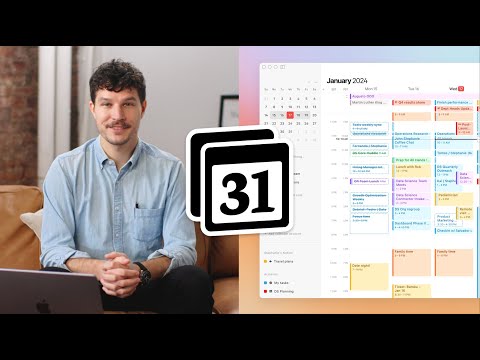
Notion Calendar is a free calendar app from Notion that brings your calendar accounts and your Notion workspace into one view. It started as Cron, a design-led calendar for power users that Notion acquired in June 2022, and relaunched as Notion Calendar in January 2024. It connects Google, iCloud and Microsoft Outlook calendars, shows deadlines and project timelines from Notion databases next to your meetings, and lets you share scheduling links so others can book time with you. The app is built for speed: a command menu and keyboard shortcuts, several time zones side by side, meeting joins straight from the menu bar, and home screen widgets on iOS and Android.
Where Notion Calendar fits in 2026
Notion Calendar is aimed at people whose work already lives in Notion, such as founders, marketers and small teams who want meetings, tasks and notes in one place without paying for another tool. Any Notion database with a date property can be added as a layer (up to 20 databases), and you can change the title, date, time or select properties of those items right from the calendar. From any event you can attach a Notion page or start AI Meeting Notes, which transcribe the call and capture key points and action items in Notion. That last part is a Notion AI feature and needs a Business or Enterprise plan.
The app now also works beyond Google: iCloud calendars connect with an app-specific password, and Microsoft Outlook and Microsoft 365 accounts connect on desktop and web, with mobile support listed as coming soon. The limits are in teamwork and scheduling depth. Seeing a teammate’s calendar requires Google Workspace accounts, and scheduling links cover one-off and recurring availability on your own calendar. Round-robin routing across a team, payments and booking reminders are what dedicated schedulers such as Calendly and Cal.com add.
How Notion Calendar compares to alternatives
Versus Google Calendar: Google Calendar is the calendar most Notion Calendar users already have, and Notion Calendar can sit on top of the same account as a faster, keyboard-driven client that adds Notion databases, iCloud and Outlook calendars, and free scheduling links. Google’s own appointment schedules give a free personal account one booking page, while more booking pages, email reminders and payments need an eligible Google Workspace or Google One plan. Versus Calendly: Calendly is a dedicated scheduling platform. Its free plan covers one event type and one calendar connection, Standard costs $10 per seat per month billed yearly, and Teams ($16) adds round-robin and team scheduling plus lead routing. Notion Calendar’s scheduling links are free and live inside your calendar, which is enough for founders and individual sales calls, while teams that route inbound demand across reps need Calendly or a similar tool. Versus Cal.com: Cal.com’s free plan for individuals already includes unlimited event types and calendars, email and SMS notifications, and Stripe or PayPal payments, and Teams ($12 per user per month billed yearly) adds round-robin scheduling and routing forms. Pick Cal.com when booking is a workflow in itself, and Notion Calendar when you want one calendar app for meetings, Notion tasks and simple booking links.
FAQ about Notion Calendar
How much does Notion Calendar cost?
Nothing. Notion Calendar is free to download and use on Mac, Windows, the web, iOS and Android, and there is no paid tier for the calendar itself. You need a Notion account, which is created for free when you sign up. The only paid part is Notion AI: AI Meeting Notes, which you can start from a calendar event, need a Notion Business or Enterprise plan.
Does Notion Calendar have a free plan or trial?
The whole app is free, so there is no trial or paid upgrade to unlock. Scheduling links, Notion database layers and multiple calendar accounts are included for every user. Notion offers a free trial of AI Meeting Notes, and after that the feature needs a Business or Enterprise plan.
Which calendars does Notion Calendar work with?
Notion Calendar connects Google Calendar accounts, iCloud calendars and Microsoft Outlook or Microsoft 365 accounts. iCloud needs an app-specific password from your Apple account, and Outlook currently works on desktop and web, with mobile support listed as coming soon. You can connect several accounts and auto-block busy slots across them, and video calls work with Google Meet, Zoom and custom links for tools such as Microsoft Teams.
Is Notion Calendar the same as Cron?
Yes. Cron was a calendar app that Notion acquired in June 2022, and in January 2024 Notion announced that “Cron is now Notion Calendar”. The Android app still carries the package name com.cron.calendar, and the desktop app’s link scheme still starts with cron://.
Where can I download the Notion Calendar app?
Notion Calendar has desktop apps for macOS and Windows, a web version, and mobile apps for iPhone on the App Store and for Android on Google Play. There is no version optimized for iPad yet. All download links are on the Notion Calendar page.
Does Notion Calendar have scheduling links?
Yes. On desktop and web you can create one-off links for a specific meeting or recurring links for things like sales calls and user interviews, with an optional expiration date, booking window, location, video link and description. Invitees pick a free slot and the meeting lands on your calendar, and with “Avoid conflicts” turned on the link updates as your schedule fills up. Invitees can reschedule or cancel from the event description.
How does Notion Calendar integrate with Notion?
You connect a Notion workspace in the settings, then add any database with a date property as a calendar layer, up to 20 databases. Items show up next to your events, and you can edit their title, date, time or select properties, such as a status, without leaving the calendar. Events can also link Notion pages or create AI Meeting Notes, which are saved to a meetings database in your workspace.
Notion Calendar vs Google Calendar: what is the difference?
Google Calendar is the calendar service with its own web and mobile apps, and Notion Calendar is a separate app that can use your Google account, as well as iCloud and Outlook, as its source. Notion Calendar adds Notion database layers, AI Meeting Notes from events, free scheduling links and a keyboard-first interface, while Google Calendar has its own appointment schedules with one free booking page on a personal account. You can keep Google Calendar as the backend and use Notion Calendar as your daily front end.
Can Notion Calendar replace Calendly?
For one person sharing availability, often yes: scheduling links are free, support recurring and one-off availability, avoid conflicts and let invitees reschedule. For teams that need round-robin distribution, lead routing, payments or meetings sent to a CRM, Calendly (from $10 per seat per month billed yearly, with round-robin on Teams from $16) or Cal.com is the better fit.
What are Notion Calendar alternatives?
The main alternatives are Google Calendar itself, Calendly and Cal.com for dedicated booking pages, and SavvyCal for scheduling links that let invitees overlay their own calendar. If you only need a calendar client, the apps that come with your Google, Apple or Microsoft account are the default alternative.
What are Notion Calendar reviews?
Notion Calendar is rated 4.7 out of 5 on the US App Store from 7,749 ratings and 3.5 on Google Play from 18,275 ratings. It has no separate listing on G2 or Capterra, whose Notion pages cover the Notion workspace rather than the calendar app.
Does Notion Calendar have an API?
Not a data API. Notion Calendar has a small local API, a cron:// link scheme that opens a specific event in the desktop app on macOS and Windows. To work with the data itself, developers integrate with the underlying calendar (Google, iCloud or Outlook) for events and with the Notion API for the database items that Notion Calendar shows.
Does Notion Calendar use AI?
Yes, through Notion AI. From an event in Notion Calendar you can start AI Meeting Notes, which transcribe the meeting and pull out key points and action items, and open the summary afterward. Notion’s Custom Agents can also read events, find times and create or update meetings through a Calendar connection. Both need a Notion Business or Enterprise plan.
How does Notion Calendar work?
You download the app, sign in with your Notion account and connect at least one Google, iCloud or Outlook calendar. Events stay in sync with those accounts, while Notion database items appear only inside Notion Calendar, not in Google or iCloud. You then add Notion workspaces and databases as layers, set up conferencing such as Zoom, and create scheduling links from the Scheduling panel or with the S shortcut.
Notion Calendar pricing
Notion Calendar is free. Billing: Free, Notion account required. See the full Notion Calendar pricing page for current tiers and any add-ons.