

In short
- Shared inbox for email, SMS, social, and team chat in one workspace
- Collaboration features (internal comments, assignments, drafts on each email)
- 100+ native integrations and a strong API
- Best fit: cross-functional teams who collaborate in email (support, ops, account management)
What is Front
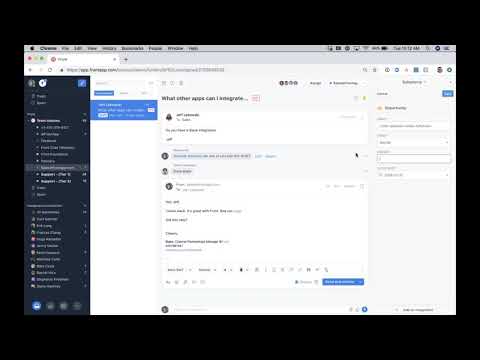
Front is a collaborative shared inbox for teams who work in email together. The product looks like a polished email client (Gmail-shaped, not Zendesk-shaped) but adds team collaboration on top: internal comments on conversations, shared drafts, assignments, mentions, and workflows. Front covers email, SMS, social DMs, and team chat in one workspace, with 100+ native integrations to CRMs, Slack, Asana, Salesforce, and the rest of the SaaS stack.
Where Front fits in 2026
Front is the right pick for cross-functional teams who actually work in email together. Support is one use case but rarely the only one. Operations teams managing logistics inboxes, account managers handling customer escalations, sales teams responding to leads, finance teams handling vendor billing. The product shines when multiple stakeholders need to collaborate on the same conversation without forwarding chains or “+1 to my reply” patterns.
The honest trade-off is depth in any single discipline. Front is broader than Help Scout but less focused on support workflows. Less ticket structure than Zendesk, less e-commerce depth than Gorgias, less chat sophistication than Intercom. For pure support, a focused helpdesk usually wins. For collaborative inbox-as-a-platform across multiple departments, Front is one of the best options on the market and consistently scores 4.7 on G2 with 2,300+ reviews.
How Front compares to alternatives
Versus Help Scout: Help Scout is more support-focused with Docs and Beacon bundled. Front is broader collaboration-focused across multiple departments. Pick Help Scout for a polished customer-support team tool; Front for shared-inbox-as-a-platform. Versus Zendesk: Zendesk is structured ticketing with deep customisation. Front is unstructured collaborative email. Pick on whether your work fits ticket workflows or email workflows. Versus Hiver: Hiver lives inside Gmail with similar collaboration features. Front is a standalone product with broader channel coverage and stronger integration depth. Pick Hiver to stay native in Gmail; Front to leave Gmail behind.
FAQ about Front
How much does Front cost?
Front Starter is $25 per seat per month (annual), capped at 10 seats and one channel. Most teams need Growth or Professional at around $65 per seat per month to get multiple inboxes, automations, and analytics. Scale and Premier tiers add enterprise features and price.
What are the main Front alternatives?
The closest alternatives are Missive ($14-$18/user/month, often half the cost of Front), Hiver ($19/user/month, Gmail-native), and Help Scout for ticket-style support. Google Collaborative Inbox is free with Workspace if you only need basic shared inboxes.
Is Front a helpdesk or an email client?
It is a hybrid. Front is built as a collaborative shared inbox for email, SMS, WhatsApp, and chat, with helpdesk-style features like assignment, internal comments, automations, and SLAs. It is better suited to teams who live in email (ops, success, account management) than pure ticket-based support.
Does Front integrate with Salesforce and HubSpot?
Yes. Front has native integrations with Salesforce, HubSpot, and most major CRMs, so customer context and conversation history are visible inside Front and email activity logs back to the CRM.
How to use Front?
Sign up at front.com, connect your team email accounts, and invite teammates into shared inboxes. Most teams are collaborating on email within an hour.
Why choose Front?
Front feels like Gmail with team collaboration on top, making it the natural pick for support, ops, sales, and account-management teams who don’t want a traditional helpdesk UI.
How does Front work?
Front consolidates email, SMS, and messaging into shared inboxes where teammates can assign, comment, and draft together without forwarding or CCing.
Is Front free?
No, Front starts at $19 per seat per month after the 7-day free trial. See front.com/pricing for plan details.
How to learn Front?
Front maintains documentation at help.front.com and runs Front Academy. Their YouTube channel has product walkthroughs and partner agencies offer paid training.
What are Front reviews?
Front is rated 4.7 on G2 with 2,429 reviews. See the reviews for detailed feedback.
Does Front have an API?
Yes, Front provides a REST API for conversation, contact, and analytics management. Documentation is at dev.frontapp.com.
Does Front have a trial or a demo?
Yes, Front offers a 7-day free trial. Sign up at front.com.
Does Front have AI?
Yes, Front’s AI suite includes Copilot for assisted reply drafting, Autopilot as an omnichannel AI agent, Topics for automatic conversation categorization, and Smart QA and Smart CSAT for quality and sentiment scoring. AI is positioned as core to the product, not an add-on.
Front pricing
Front pricing starts at $19/seat/mo. Billing: Starter $19 / Growth $59 / Scale $99 / Premier. A 7 days free trial is available. See the full Front pricing page for current tiers and any add-ons.